
Introduction
Operating System
- Provide consistent abstractions to applications, even on different hardware
- Manage sharing of resources among multiple applications
- The key building blocks:
- Processes
- Threads, Concurrency, Scheduling, Coordination
- Address Space
- Protection, Isolation, Sharing, Security
- Communication, Protocols
- Persistent storage, transactions, consistency, resilience
- Interfaces to all devices
- Illusionist
- Provide clean, easy to use abstractions of physical resources
- Infinite memory, dedicated machine
- Higher level objects: files, users, messages
- Masking limitations, virtualization
- Provide clean, easy to use abstractions of physical resources
- Referee – Manage sharing of resources, Protection, Isolation - Resource allocation, isolation, communication
Syllabus
- OS Concepts: How to Navigate as a Systems Programmer!
- Process, I/O, Networks and Virtual Machines
- Concurrency
- Threads, scheduling, locks, deadlock, scalability, fairness
- Address Space
- Virtual memory, address translation, protection, sharing
- File Systems
- I/O devices, file objects, storage, naming, caching, performance, paging, transactions, databases
- Distributed Systems
- Protocols, N-Tiers, RPC, NFS, DHTs, Consistency, Scalability, multicast
- Reliability & Security – Fault tolerance, protection, security
- Cloud Infrastructure
Virtualizing the Machine
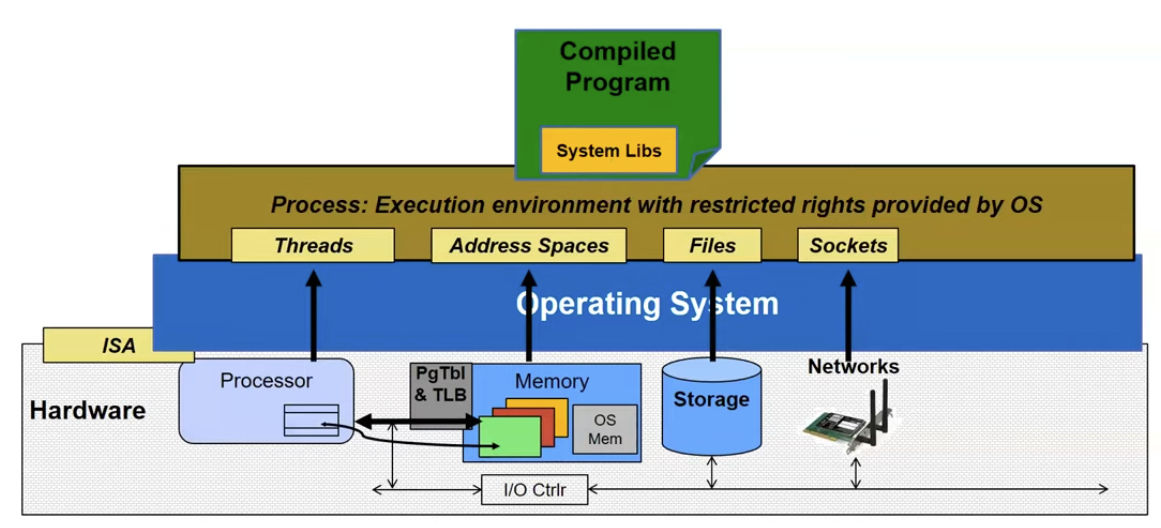
- ISA
- Application’s “machine” is the process abstraction provided by the OS
- Each running programming runs in its own process
- Processes provide nicer interfaces than raw hardware
- Process
- Address Space
- One or more threads of control executing in that address space
- Additional system state associated with it
- Open files
- Open sockets (network connection)
- …
- Threads – locus of control (PC) – Its registers (processor state when running) – And its “stack” (SP) - As required by programming language runtime
Switching Processes
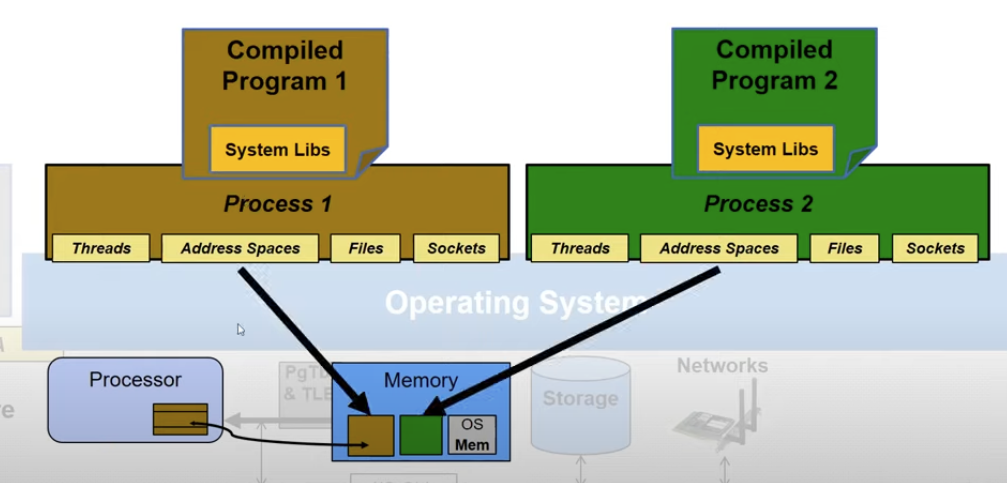
Here we have two compiled programs running at the same time. They are isolated to each other. But we only have one processor. How can these two processes appear to be running at the same time?
Each process has its own process descriptor in memory, and the OS will protect the memory. The CPU core will switch between these two processes by loading their process descriptors into the registers. Since the switching happens so quickly, it gives the delusion that multiple processes are running at the same time.